From creating tests to grading — it's all done by artificial intelligence !

Automatic test generation, test booklet creation, fast result grading and knowledge management.

For schools
For learning centers
For tutors
For tutors

How does it work?

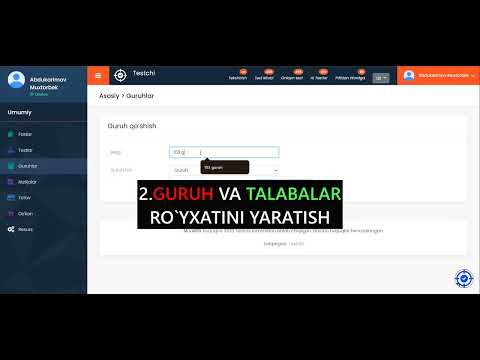
This video explains how the system works, we recommend watching it.
Our services

Creating a test booklet

Using your ready-made questions, automatically build test booklets of the size and difficulty you need!

Random selection - New, non-repeating tests every time
Flexibility - Exactly the number of questions you specify is selected.
Fast creation - Get your test booklet in a few seconds.
Test kitobi
Milliy sertifikat javoblar varaqasi va test yaratish oynasi

DTM and National Certificate mock exams

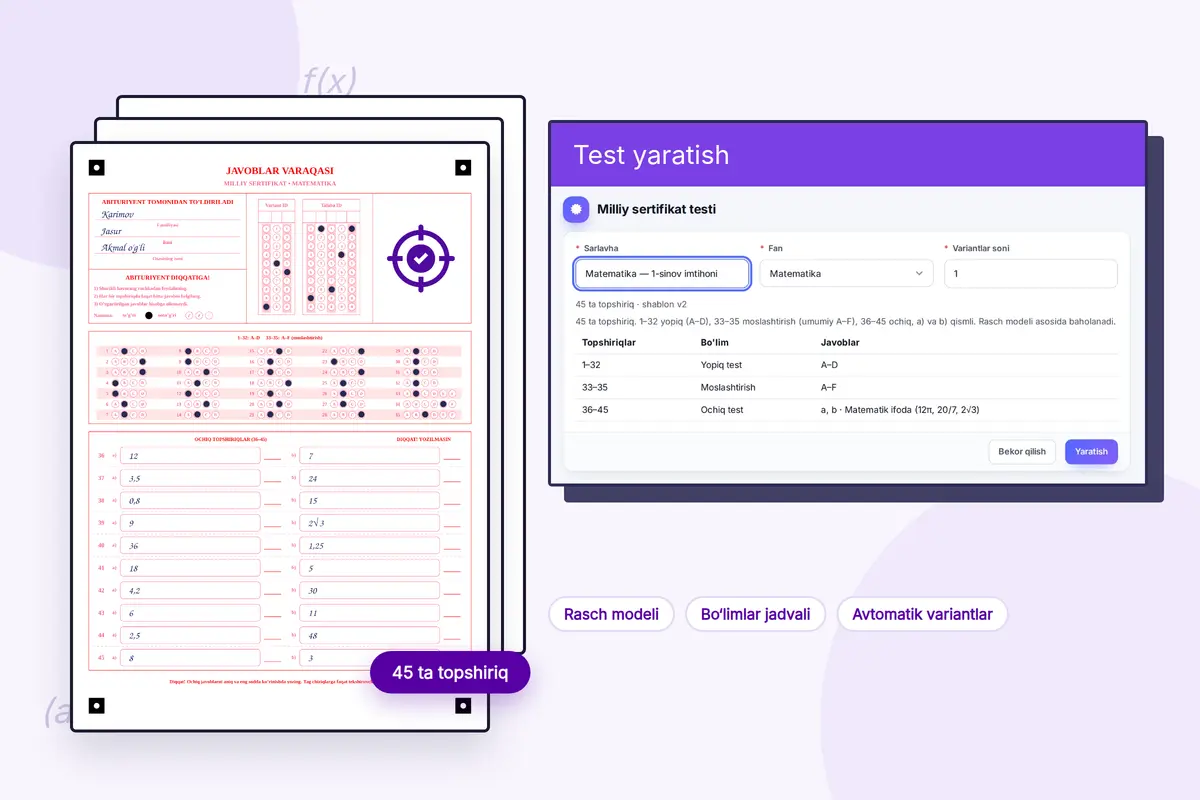
A mock exam in the official format: 45 tasks — 1–32 closed, 33–35 matching, 36–45 open-ended. Results are scored with the Rasch model.
Rasch model - The score accounts for task difficulty, so groups can be compared with each other.
Ready-made structure - The section table and a separate variant for every student are built automatically.
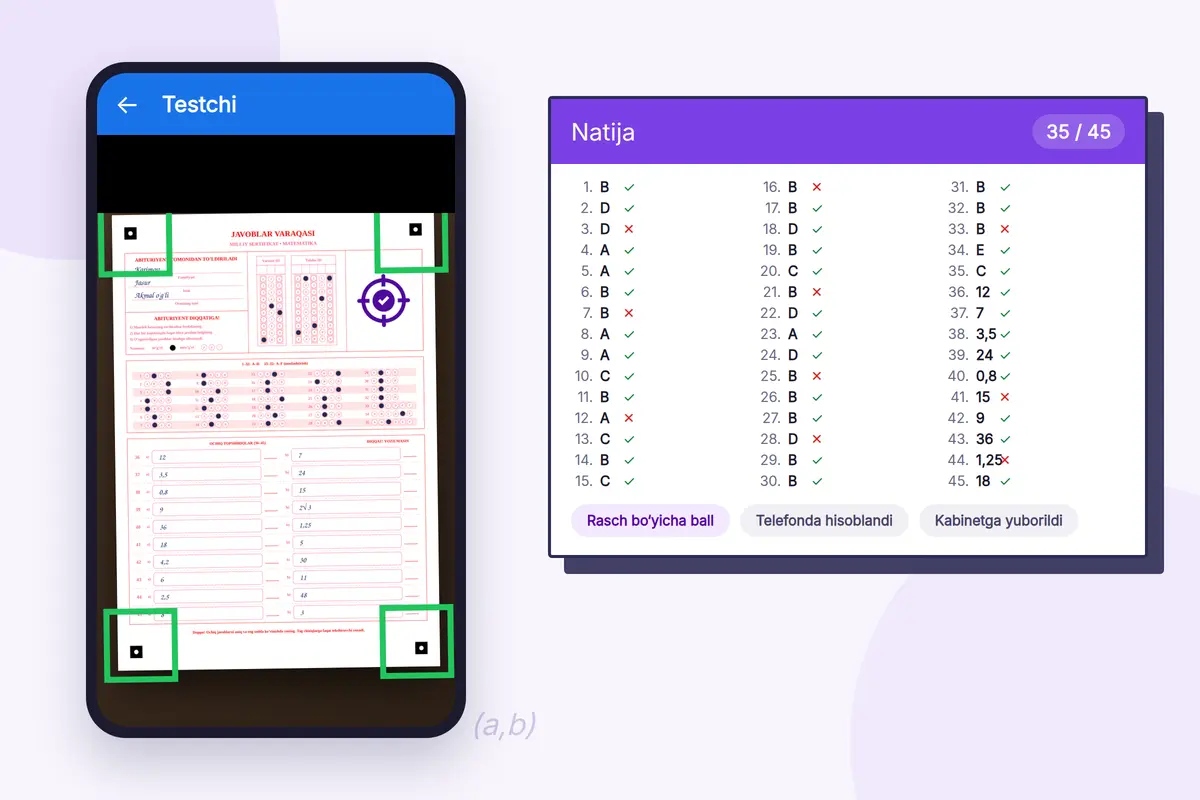
Answer sheets automatically - National Certificate answer sheets are checked with the camera too.
Testchi ilovasi titulni kamera orqali tekshirmoqda va natija ro'yxati

Checking answer sheets with your phone camera

Point the camera at the answer sheet — the Testchi app detects the marked answers and calculates the score itself.

On the phone itself - Recognition runs on the device itself and the score appears in seconds.
Both sheet types - Both regular sheets and National Certificate sheets are checked.
The result lands in your dashboard - A checked sheet goes straight into the student's and the group's analytics.
Google Play
Test kitobi

Creating test questions with artificial intelligence

Use artificial intelligence to generate questions from your uploaded materials, matched to the topic and difficulty level.
Fast and efficient - Create high-quality test questions in a few seconds.
Topic and difficulty level - Tune the tests to the curriculum and the difficulty level.
High-quality, accurate tests - Build well-formed questions for every subject.
Word faylidan savollarni import qilish

Importing questions from a Word file

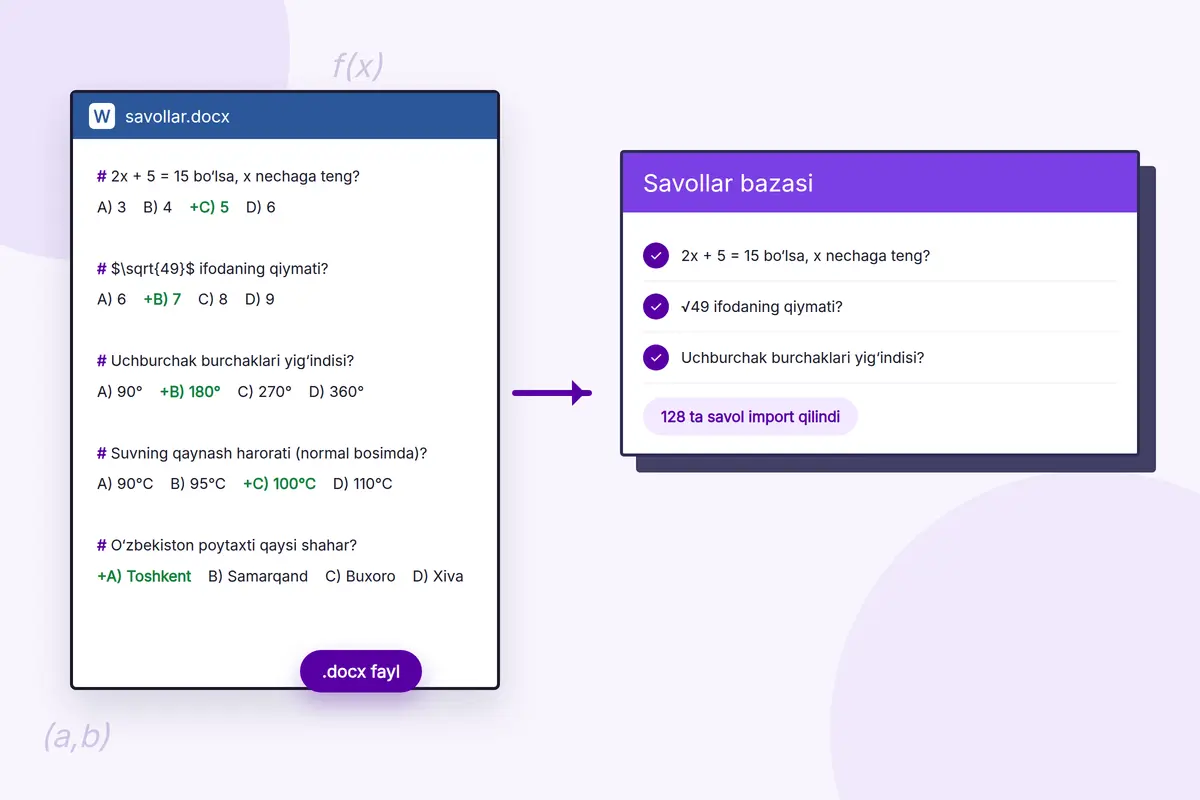
Don't retype questions you already have: upload a .docx file and the questions, options and correct answers land in your bank by themselves.

A simple format - Questions start with #, options are written as A) B) C) D), and the correct answer is marked with +.
Formulas are preserved - LaTeX formulas and question images stay where they belong.
From PDF to Word - Convert a PDF into an editable Word file, then import it.
Test kitobi

Taking tests online

Now online tests can be taken conveniently on any device, from anywhere, with the result shown right away.

Convenient and fast - Take tests on a phone, tablet or computer.
Fast results - See your results as soon as the test is finished.
Server-side timer - Time is counted on the server: refreshing the page or changing the phone's clock adds no extra time.
Autosave - Every answer is saved instantly — it survives a page refresh or a closed browser.
Tab-switch monitoring - If the teacher enables it, switches to another window are logged and the test stops after the set limit.

Interactive reports and analytics

Results are no longer just numbers — they come as visual, interactive reports. Each student's strengths and weaknesses are clearly visible!

Identifying strengths and weaknesses - Find out which topics each student is strong in and where extra lessons are needed.
An important tool for teachers and schools - Improving teaching quality through an individual approach.
Results-based decisions - Real-time analytics for shaping your teaching strategy.
Month-by-month reports - In the Monthly report, compare a group's results across two months: whose performance went up and whose went down.
Test kitobi
Test kitobi

Groups and student database

No more time spent storing and tracking each student's and group's data separately! Manage everything digitally through the electronic student database.

A centralized student database - All student data is kept in a single system.
Real-time result tracking - Test results and progress are recorded automatically.
Convenient group management - Create separate groups for different subjects and courses.
Joining via an invite link - Send the link and students join the group themselves — no need to enter the list by hand or from Excel.

Our plans

Starter plan

  • 1 variant = 1 credit Create a test booklet
  • 1 student = 1 credit Create an online test
  • 1 sheet = 1 credit Check the regular test answer sheet
  • 1 question = 1 credit Creating a test using artificial intelligence
  • 1 page = 1 credit Convert from PDF to Word
  • 50 Group and student base
  • Test sharing
  • Report generation
  • Access to results
  • Copying and sharing questions
  • Fixing faulty questions
  • Access to the Store section
Free

270 bonus credits on sign-up.

Subscribe

Basic plan

  • 1 variant = 1 credit Create a test booklet
  • 1 student = 1 credit Create an online test
  • Unlimited Check the regular test answer sheet
  • 1 sheet = 3 credits Check the National Certificate answer sheet
  • 1 question = 1 credit Creating a test using artificial intelligence
  • 1 page = 1 credit Convert from PDF to Word
  • Unlimited Group and student base
  • Test sharing
  • Report generation
  • Access to results
  • Copying and sharing questions
  • Fixing faulty questions
  • Access to the Store section
99,000 UZS/year

Includes 250 credits. 1 extra credit = 100 soums.

Subscribe

Enterprise plan

  • Building a question bank
  • Creating a test booklet
  • Test sharing
  • Answer sheet check
  • Group and student database
  • Report generation
  • Access to results
  • Copying and sharing questions
  • Fixing faulty questions
  • Access to the Store section
  • Creating an online test
  • Questions via artificial intelligence
  • PDF to Word conversion
  • API integration
  • Custom branding
  • Dedicated support
Negotiable
Contact us

What people say about us

Frequently asked questions

Question 1: What is a test task booklet?
Answer: A test task booklet is a collection of questions covering a given set of subjects.
Question 2: What is an answer sheet?
Answer: The answer sheet is the single document used to mark one chosen answer for each task in the booklet, and it is the basis for assessing the applicant's knowledge.
Question 3: What is a credit and how is it spent?
Answer: A credit is the billing unit for actions on the platform: 1 test booklet variant, 1 student taking an online test, 1 checked answer sheet, 1 AI-generated question and 1 PDF page converted to Word. Each service's price is listed openly on the plan card; you get bonus credits when you sign up and can top up later in the Plans section of your dashboard.
Question 4: My Word file won't import — what could be wrong?
Answer: Common causes: the file is not .docx (the old .doc format is not supported), it is larger than 15 MB, the question has no # in front of it, or the correct answer is not marked with +. Options are written as A) B) C) D) and there must be between 2 and 5 of them. Formulas must be written in Word's own formula editor — formulas pasted as pictures cannot be read as text. Imported questions are not saved straight away: you review the list, edit it and only then save.
Question 5: The app won't read the answer sheet — what should I do?
Answer: Put the sheet on a flat surface and hold the camera so that the marks in the four corners fall inside the frame — the photo is taken once all of them turn green. Keep the lighting even, with no shadows or glare. Answers must be filled in completely with a dark pencil or pen. If the score comes out wrong, check the answer key first: once the key is fixed, rescanning the sheets is enough.
Question 6: If the internet drops during an online test, are the student's answers lost?
Answer: No. Every answer is saved instantly and also kept on the device: after a page refresh or reopening the browser, the student continues from where they left off. Time is counted on the server — refreshing the page or changing the phone's clock adds no extra time.
Question 7: How do I add students to a group?
Answer: There are three ways: send the invite link and students join themselves; upload the list from an Excel (CSV) file; or add each student by hand. The invite link can be closed at any time. The number of students depends on your plan's limit — once it is reached, no new students can be added.